Monday, October 17, 2011

Amazing Race - Google Earth Style

Tonight was a good opportunity for the club members to practice what was learnt in Google Earth with a fun competition.


But first the Agenda:
  • Take register
  • Photographic competition
  • Year-end function
  • Google Earth competition

Spur Photographic Competition
Spur is hosting a cool photographic competition. Some of the prizes are binoculars, digital cameras and Spur meal vouchers. The poster is up on the wall in my lab for learners to read and they can get entry forms from me.

SCC Year-End Function
We'd like to end our Sunridge Computer Club year off with a nice little get together. So if any of our parents have any thoughts on this then I'd really like to hear from you.

Google Earth Competition
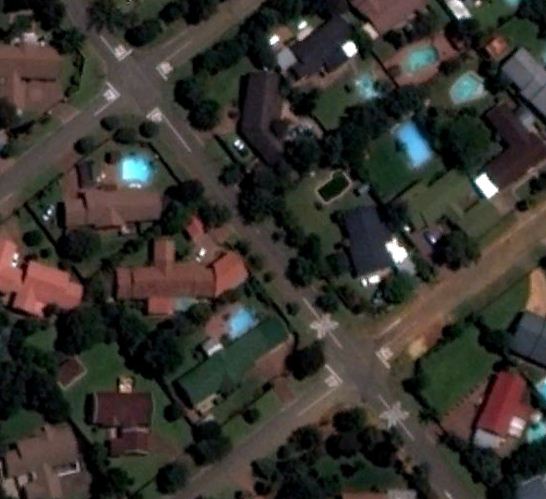
So we spent two computer club lessons on Google Earth. Tonight was the night that we use what we learnt to truly go out and explore (virtually that is). And what would a competition be without a nice reward. Daniel won the large tub of Woolies sweets for finding all 5 locations and answering the questions correctly.

The questions were:

  1. What is the name of the Street which crosses Pyramid St, Johannesburg (Edenvale). There is only one Road which crosses it, the other are all T-Junctions.
  2. What is the name of the Road which passes under Cresta Shopping Centre, Johannesburg?
  3. How many cars are parked on the sidewalk outside 19 Cassia Drive, Port Elizabeth (Sunridge Park)?
  4. What colour are the drive way gates at 111 Church Road, Port Elizabeth (Walmer)?
  5. What word/words are painted on the road near the corner of Myrna and Pyramid St,  Johannesburg (Edenvale)?
Club members had to use some common sense, Google Earth, and Google Street View to answer the location and give me their answers. This was a fun exercise.


Diary
Please Note that our next computer club meeting will only be on Monday evening, 14 November 2011 as I will be busy with Computer Literacy and Cami Maths assessments from 31 Oct to 11 November.

Untill next time...


Monday, September 19, 2011

Going Street Level

We all know of the White House in Washing DC. We've seen in on TV and in the movies. We might even know where it is located on the map. Google gets us as close to the real thing as we'll ever be without the First Lady inviting us for tea.

But first, the agenda:
  • Take register
  • SCC badges
  • Lesson: Google Earth part 2

SCC
Badges

Please note that the winking emoticon on the computer screen with keyboard and mouse is the official Sunridge Computer Club emblem. The computer club badge is part of the Sunridge uniform and should be worn along with the learners' other badges.

Google Earth
We recapped on what we learnt with our previous club meeting about using the navigational tools in Google Earth while we waited for the imagery to load. Specific addresses were explored using Google's "Fly to" feature. We looked at a local address in Newton Park, Port Elizabeth. Then we were off to Three-Anchor Bay in Cape Town where we took it down to street level by using Street View. We learned how to look and move around whilst in Street View.

The highlight of our virtual tour was viewing the White House in Washington DC. Not only were we able to view the White House and White House gardens from above but we were also able to turn on the 3D imagery created in Google Sketchup and view the White House, surrounding building, and even the trees in the garden in 3D.

Back home here in Sunridge Park, the difference between Altitude and Elevation was also explained. As too were the age of the imagery and the process involved in obtaining these images.

Diary
This was our last club meeting for the 3rd term. Our next club meeting will be on Monday evening, 17 October. Have a wonderful September holiday.

Until next time.

Monday, August 29, 2011

Navigating the Earth

Technology and the availability of information has made major strides in the past couple of years as the internet becomes accessible to more people. For instance... Isn't it incredible how the internet has allowed us to explore our planet without even leaving our house with applications like Google Earth & Google Street View?

But before we get into that, here's our Agenda:
  • Take Register
  • Tourist Attractions
  • Lesson: Google Earth part 1

SA Tourist Attractions
The members came up with some nice ideas of tourist attractions which we might want to take our Hawaiian friends on tour of. The idea is to set up a tour in Google Earth of the selected places with accompanying photographs and some interesting facts for each place. These are some of the ideas we have in mind: Table Mountain; Kimberly's Big Hole; The Drakensburg; uShaka Marine World; the Cango Caves; the Donkin Reserve; and Robin Island; and of course Sunridge Primary School.

Google Earth
I can remember the first time I heard about Google Earth. "You can see your house as seen from a satellite. And you can see any place on Earth", I was told. It sounded to good to be true. That was 6 years ago. Now Google Earth has pretty much become a household name. And many of us use it all the time to find the location of where we need to go; to get directions from point A to point B; to see what our school, house, factory looks like from above; where places are in relation to each other; and even to take measurements.

We started learning about Google Earth by getting to know the navigation controls and familiarising ourselves with terminology like: panning; tilting; rotating; and zooming. We looked at Sunridge Primary and navigated to Table Mountain to see how the tilting control can emphasise terrain.

We also spoke briefly about data transfer speeds and how much bandwidth is used by Google Earth in order to understand why we have to wait for our blurry images to become clearer. We will be spending quite some time on Google Earth, getting to know it well. We will also use Google Earth in our current project and possibly for future lessons.

Thank you
Thank you very much to our dedicate parents for making sure that the club members get to class on time and are collected on time.

Diary
Next week is outdoor education week. In the past, I found that it is not a good idea to schedule anything for the first couple of days after our return. Thus, I'm skipping an extra week. Our next computer club meeting will be on Monday, 19 September 2011.

Until next time...

Monday, August 15, 2011

Location, location, location...

Boy of boy, time really flew tonight. At least the mystery location was revealed . I was impressed. We had quite a few accurate calculated guesses.

But first, the agenda:
  • Mystery location
  • Brainstorm
  • Places of interest
  • Useless but cool

Mystery Location

I asked the question: Where would we end up if we were to dig straight down into the ground right here where we're standing in Port Elizabeth and keep tunneling through the Earth? And the answer is... Hawaii!!!. Map tunneling tools freely available on the internet - like this one - show us that we actually end up in the middle of the North Pacific Ocean. That point is pretty much surrounded by the USA. We have California to the right, Alaska at the top, and Hawaii at the bottom. Since Hawaii is the closest landmass to our exit point we will attempt to contact a school in Hawaii and Collaborate with them.

Brainstorm
We spent some time on the carpet and brainstormed a couple of things to do with the Hawaiians. Some of the ideas we came up with are: to try and have a Skype session with them at some point (even though they are 12 hours behind us); Write a letter (old school) and mail it off to them and and see how soon we receive our reply (This could be a nice way of demonstrating the usefulness of email over snail mail); compete in a real time online educational game; dress up one of our club members as we traditionally think of Hawaiians (that will be funny); do "a day in the life of an Hawaiian" as a small play; create a tour of SA using Google Earth and Google Maps. The idea is for us and the Hawaiians to do the same activity for each other.

Places of Interest
The SCC club members were given some homework. Each person have to nominate a place of interest here in South Africa which we will use in our virtual tour. It could be a natural place like our wonderful Table Mountain or a man made place like uShaka. Club members don't need to provide information about the place but they must at least be able to say where in SA it is.

Useless but Cool
I checked out some rather useless websites courtesy of Larry Ferlazzo. Although these websites don't serve much of an educational purpose I thought we can let our hair down a bit after our wonderful Strange & Unusual Jobs project.

One such site is Burger King's Subservient Chicken. Basically it is a man dressed in a chicken suite who carries out basic instructions you type into a space provided. Things like sit, walk, run, jump, sleep, and even split are accepted and the chicken pretty much allows you to make a fool of him by obediently doing what you say. Like I said - no educational value but its just a bit of fun. You can play corporal to your own chicken by clicking here.

Another website is Free Rider. They say this site is supposed to teach you about physics. I guess the fact that you need to understand how gravity and momentum works could have some value but I definitely would not classify this website as being educational. That said, I was hooked for about 2 hours. You start off with a man on a mountain bike which you can change to a unicycle, hot air balloon, helicopter, 4 X 4, etc. You then draw a line on which the man will ride his bike. You have to be aware of how he reacts to uphills, downhills, bumps, etc. You can try it out by clicking here.

Lastly I showed the members an online version of the popular game Pictionary. It's great fun because you can play with people from all across the world in real time however I think that adult supervision might be necessary which is why I'm not even going to provide a link to it here.

Well, that said, it's time to sign off.

Diary
I next club meeting should be on Monday, 29 August but I will confirm with you closer to the time.

Until next time.

Monday, August 1, 2011

And the winner is...

The winners of the best Strange/Unusual job and best avatar lookalike was announced tonight. I also announced our next exciting project.

But first, the agenda
  • Avatar lookalike
  • Project website
  • Project winner
  • Commitment
  • New project
  • Lesson

Avatar Lookalike

Keeping our learners safe is a definite priority for any teacher. This extends to the internet too. We used avatars to represent ourselves on our website, rather than use photographs of our club members together with their names on the same page. Sunridge SuperSpar was kind enough to sponsor us with a chocolate hamper for the avatar which best represents that learner. We put all the avatars up on the big screen and had the club members vote for the winner. This prize went to Sebastian. Well done Sebo.

Please note that sometimes it is unavoidable placing a learner's name and photograph together on the same page - as is the case in this blog post.

Project Website
We built an 18-page website to showcase our club members' hard work. You may view the website by visiting this link: www.sunridge.co.za/scc

Project Winner
I tried, but I simply could not choose one winner amongst so many wonderful project reports. I narrowed the possible winners down to 3 reports based on the theme of the project (Strange or Unusual jobs). Then I called in the help of my club members to help me choose. ChloƩ whas chosen by her fellow club members as reporting on the most unusual job. Her Bug Photography page report was very interesting indeed. And what did she win? More chocolates, as in lots more! Again, we have Sunridge SuperSpar to thank for this hamper too. This photograph is of me trying to take the chocolates away from ChloƩ and her hanging onto it for dear life. :-)

Commitment to the Club
On a sad note - we had to say goodbye to a club member tonight. Club members were reminded that they earned their place in the computer club and that they need to continue working hard and meeting deadlines in order to stay in the club.

New Project
I announced the Computer Club's new project tonight. This project promises to be a lot more fun and a team effort involving all of the club members working together. I asked the following question: If we were to dig a hole under our feet where we're standing here in Port Elizabeth, and keep digging until we reach the other side of the Earth, where will we end up? The members need to go find out where this place is and come tell me at our next club meeting. China, America, and a few other places were suggested. They need to be specific though. I found out that we end up in the Pacific ocean. However, there is a land mass close by. We will then choose a school in that "mystery" location and start collaborating with them. I also asked the club members to come up with ideas of what we can do with that school. The focus will be on exchanging information and learning about each other's countries. One idea is to Skype with them, and another is to email a photo of one of our club members dressed in what we think is their traditional clothes is and for them to do the same for us. But more about this project later.

Lesson: Wordle
No matter how busy we are, I always make sure we learn something new. Here's a nice little tool called Wordle. You can go to www.wordle.net and enter a couple of words, copy and paste from another list, or enter a URL into the space provided. Wordle will then make you a cool word cloud like the one the right (this is what I got when I used our computer club blog's URL). Words that appear more often in your text will be larger in your word cloud. You can change the font, shape, colour, layout and various other aspects of your word cloud or you can hit the Randomize button and get a whole new word cloud from the same words.

Diary
Our next club meeting will be on mOnDaY, 15 August 2011.

Till next time...

Monday, June 13, 2011

Cross your Words with Crosswords!

Although most of the lesson was devoted to our Strange/Unusual Job project, we spent some time looking at a nifty little online tool for creating crosswords. This tool, unlike most others, allows you to create professional-looking crosswords right from the word go - without having to register with an email address first.

But first, here's our Agenda:
  • Take register
  • Discuss project
  • Show project website
  • Check project reports
  • Lesson: Crosswords

Extra lines in blog
The fact that extra lines were created and things are moved around every time I publish this blog, has been giving me grey hair (if I had hair). :-) No seriously, it has been driving me CRAZY. But, I think I found a solution. I love Microsoft Internet Explorer but it appears that, that was the problem. I've now switched over to Mozilla Firefox (only when blogging) and VOILA, it seems to be doing the trick. One day when I have lots of time on my hands I'll go back and fix the previous blog posts which is a source of great embarrassment for me.

Project Website
I spent most of the weekend designing a website specifically for the purpose of showcasing the computer club members' hard work. Now if you have been spared being subjected to my drawing and colour matching skills so far then you have indeed been fortunate. However, I do believe that I actually managed to get it right this time. Even my computer club members were impressed - and they are a tough crowd. :-) I will only upload the website to the internet once I have added all of the strange/unusual jobs reports created by the SCC (Sunridge Computer Club) members.

The website features a home page with links to the Sunridge Primary website, the SCC blog, and to my email address. It also has a brief description of the SCC and a short introduction to the project, followed by a more detailed explanation of the project and instructions on using the website. Links are provided to each strange/unusual job report which all have a whole paged dedicated to that report featuring the SCC member's Avatar, the report itself and accompanying photographs. I will of course let everybody know when the website is up and running.

Progress on Project
I had a quick look at all of the reports completed so far. Thank you guys - they look great! I can see that instructions were carried out carefully. I always like to force as many 21st Century Skills and ICT technology into my projects. In this project many ICT devices were used by various members like: cellphones, email & internet, digital cameras, and digital voice recorders. As for 21st Century Skills: collaboration, time management, planning & preparation, and self assessment are four of the skills which really stand out. It is clear that the SCC members learnt new things through this project which they most likely would never have been exposed too. I will use the upcoming loooooog weekend to copy and paste as many of the reports as I can onto the project website. Well done everyone. Don't forget, there are two prizes up for grabs. I'll tell you more about that in the next blog post.

Just Crosswords
As you know, I like for us to learn something new and do some practical work with every SCC lesson. Tonight, I told the members about Just Crosswords. I got this idea from Larry Ferlazzo, so I really must give credit to him. The Just Crosswords website is fantastic because it allows you to create really nifty crosswords without having to register first like most other sites do. It gives you a neat interface to easily create professional-looking crosswords in no time at all. Plus, once saved, it gives you a multitude of options for sharing your crosswords with others. Go check it out at www.justcrosswords.com. It might be a nice idea to theme your crossword puzzle like I did in this example where I gave clues to famous cities across the world and some local cities.

Thank you to Members
A huge, big, giganticonormous THANK YOU to everyone for your dedication and hard work. When I saw sheets of hand written notes, lengthy reports, copious amounts of photographs, and incredibly realistic avatars tonight - that's when I realized that a lot of hard work and effort went into this project of ours.

Thank you to Parents
What can I say - without you, the parents, the computer club would not be possible. I appreciate the fact that you drop your child off on time, tired after a day's work, and collect them again as the club finishes.

Diary
It seems like Monday, 25 July will be the date of our next club meeting. It is still more than a month away so that date might change as I have not checked if it clashes with any other events on the school calendar. But, as always, I will keep you informed.

Until next time...

Monday, May 30, 2011

Did you Know???

We started off this lesson by watching a video on some eye opening facts and predictions about technology, the direction we're heading in, and of course where we come from. This reaffirms the approach to computer tutoring we take at Sunridge Primary and certainly gives us something to work towards.

But first the Agenda:
  • Take register
  • Did you Know video
  • Project instructions
  • Project format
  • Project ideas
  • Interview questions
  • Project prizes
  • Avatars

Did You Know Video
A video was released a while ago and although this video spells out how quickly technology and information advances and becomes outdated, it itself is already somewhat outdated. None the less, it still gives us a valuable insight into the world we're living in and the world we heading for. Amongst other things, it says the following: We as teachers are preparing our learners for jobs which don't exist yet. Half of what a technology degree student learns in his 1st year of studies will become outdated by the time he finishes his 3rd year. 31 Billion searches are performed on Google every month. Where on Earth did we get all our answers from BG (Before Google). The number of text messages sent and received every day are greater than the total population of the planet. It took radio a total of 38 years to reach a target audience of 50 billion people, TV did it in 13 years, Facebook in just 2 years. The top 10 jobs in 2010 did not even exists in 2004.

The Strange or Unusual Jobs Project
I am pleased to see that some of the members have already finished their interviews and gathered their photographs for the project. Well done guys! It also became clear from our brainstorming session tonight that almost everyone else gave the project some serious thought and have a good idea of what they want to do.

I laid the instructions for the project out carefully tonight. And for the benefit of the parents, here it is again. Every club member must find a person who does a strange or unusual job - not something we would probably encounter through one's day to day life. Mom and Dad can help out here. I'm sure you must be able to think of someone perhaps in your circle of friends. Someone who maintains a golf course, someone who make dentures, someone who makes artificial limbs, and a dog food taster are just 4 of the fantastic ideas which have already been taken.

The club member then needs to prepare a list of questions and interview that person, asking them about their job, what exactly they do, a typical day at the office, what is the best part of their work, how did they get started in this field, etc. Once you get going you will see that there are many other questions you can ask. You also need to take/get 2 or 3 photographs of that person's work. You need to get permission from that person to publish your report on the internet. You also need to create an avatar which looks as much like you as possible. This avatar will be used to represent the club member. Type your report up in MS Word so that we can just copy and paste it onto a webpage.

As far as the format of the published project goes. My initial intention was to create a blog with each report being a blog entry. I decided against this as a blog really is an ongoing thing which needs to be updated all the time. Therefore, I decided to rather do it as a website with each report being put on a separate webpage. This will also allow us a lot more freedom with regards to formatting.

Project Prizes

I would like to offer two prizes. One for the avatar which most accurately portrays the club member, and the bigger prize will go to the best strange/unusual job report. I will supply these prizes with the greatest of pleasure but if anyone can help us out with sponsorthip it would be greatly appreciate. Even if you have any suggestions as to what would make for good prizes, I'd like to hear from you.

Avatars

Finally, we spent some time playing around with the avatar creator and I showed everyone how to export the avatar once done. Go to http://www.myavatareditor.com/ to create your own avatar.

Diary

Our next club meeting will be on Monday evening, the 13th of June at 17:15.

Until next time...