Monday, July 23, 2012

QR Codes - Scan 'em

We see them more and more all over the these days - in magazines, all over the internet, on your Blackberry, and many other places. I'm talking about QR Codes (see image on the right).

This evening's computer club activity was very cool. Club members had to move around the school, find, and scan 6 QR Codes in order to answer two  questions.

The 6 QR Codes were:
  1. Google map location (The White House in Washington DC)
  2. Wikipedia page on Barack Obama
  3. A local website
  4. A line of text
  5. An email address
  6. A telephone number
What are QR Codes:
QR stands for Quick Response. A QR Code is like the barcode (UPC barcodes = universal  product codes) you see on products your Mum buys at Spar.
What do they look like? For those of you who’s never scanned a BB PIN, it is a series of (black) squares arranged in the shape of a larger square. It was invented by a part of Toyota in Japan. A QR Code has 3 very obvious squares on three corners and another smaller square near the 4th corner.  The scanner uses these squares to normalise the image size, orientation, and angle. The small dots are then converted to binary numbers.

The normal barcode you see on a product tells the till (Point of Sale) what the product is being scanned and it's price. But a QR Code can do so much more than a normal barcode.
It can take you to an online location like: A website; Google map location; Youtube video; Facebook page; Twitter account; Linkedin account; Foursquare account; An app store download; iTunes link; Open up a new email message with the “To” field already filled in; Open a Skype call. It can also hold: Lines of text like a sentence; VCard; VCalendar; An Email address; Telephone number.


The Process:
Club members were instructed to download a free QR Scanner. They were divided into 6 teams. Each team received a form with the two questions and a pen. Armed with their mobile devices, they had to find and scan the 6 QR Codes in order to reveal the clues. They then had to Google and piece together the clues. This quiz was hard but the computer club boffins proved themselves worthy again. "Excitement" was at the order of the day as they hurried through the clues and kept their answered secret from the other teams - very competitive. :-)

The Questions
1. Who is the focus of this scavenger hunt?
2. Who should we send this information to and in which South African city does he/she live?

The Winners
And the winners were Jana, Gerrit, and Frans. The 3 of you may come collect your prizes from me on Thursday, 26 July. Well done!!!

Diary
Our next club meeting will be on Monday, 6 August 2012.

Until next time... Take care.

Monday, June 11, 2012

iNtErNeT SAFEty


The Sunridge Computer Club started off it's club meeting tonight with a brainstorming session. We all got down to each other's level (seriously - we all sat on the floor) and discussed ideas and shared our thoughts on internet safety. We soon realized that it EASY to say something but you need to understand WHY in order to back it up. Here are just some of the ideas the club members mentioned. Some relate to cyber bullying too:
  • Don't give out your address and telephone numbers online
  • Don't give information about your family's movements - like that your parents go out every Wednesday night leaving you and your baby sister home alone
  • Watch out for posting pictures which could identify your location - like a landmark in the background, or your house number or street name
  • Educate and reprimand your friends for the pics they post of you. Your best friend could inadvertently be your enemy
  • Once you put something on the internet you can usually delete it but other people can copy it and repost it before that. And then you have no control
  • Don't say anything online which you won't say to somebody's face
  • Don't friend people online whom you don't know in real life
  • Don't cyber bully. It's just as bad as bullying on the playground
  • Be careful of competition and survey websites which often just want your information
  • Some websites are age restricted - for a reason
  • Tell you parents as soon as something doesn't feel right - even if it's sure to land you in a whole bunch of trouble
We also watched a YouTube video about how a seemingly nice British lad got up to mischief by friending an unsuspecting girl. You can watch the video by clicking here.

We rounded off the educational part of this evening's lesson by completing an online quiz or two. You can see these for yourself bu clicking the following two links:

Monster Basement
We had about 10 minutes left so we just had some fun with an online game. Monster Basement is hardly educational but it does provide for some fun. And that it sure did. I even got a bit of a scare (don't tell anyone).

You can find the Monster Basement game at:      http://www.godlimations.com/webfolder/monsterbasement.html

Thank you
Thank you to all the parents for picking up your kids on time. It was great not having to wait in the cold and dark for anyone.

Diary
Our next club meeting will be in term 3. I'll communicate the date to you at the beginning of the term but it will probably be on the 2nd Monday of the new term.

Until then. Goodbye, and enjoy the June holiday.


Monday, May 21, 2012

Movie Magic...

Tonight was PJ night. The entire computer club (me included) came to the meeting dressed in our pajamas. :-)

I introduced our new SCC (Sunridge Computer Club) project tonight. The plan is to create a promotional video of Sunridge Primary using cell phones.  This video will be uploaded to YouTube for all to learn about our wonderful school and Sunshine family.

We started off by watching a view YouTube Videos of other schools - both local and abroad - to get some ideas. Here are three of the videos if you'd like to see what we're aiming for. Simply click on the schools' names below.
The idea is for the computer club members to go around the school armed with their cell phones, cameras, and other recording devices to record footage of... well anything really. Then the really hard work starts - putting it all together. Splicing, stitching, narrating, adding special effects, transitions, etc. We would like to include scenes from:
  • Sporting events - matches and practices
  • The hustle and bustle as learners swap classes after the bell goes
  • Interactive moments in Grade 1 classes
  • Playground activities, learners kicking balls around, girls sitting on the benches eating their lunch and chatting
  • Art class
  • Science class
  • Computer classes
  • Music class
  • Band practice
  • Learners queuing at the tuck shop
 I will arrange with the staff to give the computer club members some freedom with their cell phones as this is usually not allowed. I'm hoping that the following 2 weeks will be enough time to collect plenty of footage which we can use in the video.

Diary
Please note that our next club meeting will be in 3 weeks time to allow me time to mark the computer literacy and Cami maths test our learners are writing as of today. The next club meeting thus, will be on 11 June 2012.

Until then...

Monday, May 7, 2012

Serving Servers


We had an interesting talk by our very own on-site technician. We visited Chris in our server room where he gave us a rundown of the six Sunridge servers.  He also covered topics like: how the firewall works; the operation of the switches; rooting; and explained our new 6KVA Uninterrupted Power Supply which maintains power to our server in the event of a power failure.  There were plenty of questions asked – one of the most popular questions was “on which machine is scadsys kept?” For those of you who don’t know, scadsys is the software which we use for – amongst other things – to record detention point.  I think we might have a prospective saboteur in our midst. J
Thank you Chris

Monday, April 16, 2012

Poof ? ? ?

A fun application with a weird name... That's what we kept ourselves busy in the computer club this evening. But more about that later. 

We started off by watching a video about a cool robot ...which can climb stairs, another which runs on a treadmill, and a third robot which... wait for it... does push-ups. :-) This was a nice way of rounding off our robotics lessons. Thank you to Mr. Woithe for sending me the link for this video.

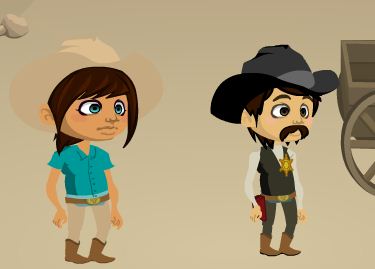
So, let's get back to the "Poof" app.  With Kerpoof Studio you can make cards, movies, pictures, drawings, tell stories, or even 'spell a picture'. Tonight we were just interested in making movies though. Two of the characters (Jane Ryder and Slim Pikkens) I used in my movie can be seen below. 


Kerpoof can be accessed by pointing your browser to www.kerpoof.com where a simple registration process and email confirmation will create your account for you - free of charge. Classroom use is made easy by a teachers tool section which allows me to create bulk accounts for my learners with very little effort - if you know how. Just a few Excel text functions allowed me to strip, concatenate, auto fill, and auto-generate relatively random password for the whole computer club, and register them all without them needing email addresses. All of this in under 3 minutes. Isn't that just peachy?


Now as for the "create a movie" section which we delved into this evening...   The very colourful and well organized interface allows you to do the following in this order:


  • Choose a theme
  • Choose a scene
  • Choose from many characters
  • Animate your characters
  • Build your animations by placing commands on the 4-channel timeline

Competition
I turned this lesson into another competition for club members to participate in. And up for grabs, is another wonderful chocolate & sweet hamper from our friendly Sunridge SuperSpar. This is what they must do. Each club member must create a movie using Kerpoof aimed at entertaining the Gr. 2/3 crowds. The best move wins the hamper. Simple. These movies must be done by the next club meeting in two weeks.


Diary
Our next club meeting will be on Monday evening, 7 May 2012 at 17:15.

That's it for now. How yourself a smashing last half of April.


Monday, March 5, 2012

Robots vs. Humans

We continued with our lesson on Robotics this evening, and started off by Googling Isaac Asimov's "Three Laws of Robotics" as made popular in his 1942 short story "Runaround". The 3 laws state that:

  1. A robot may not injure a human being or, through inaction, allow a human being to come to harm.
  2. A robot must obey the orders given to it by human beings, except where such orders would conflict with the First law.
  3. A robot must protect its own existence as long as such protection does not conflict with the First or Second Laws.

These laws are of course fictional at this point in time but it is - none the less - interesting to take note of.


We had a quick talk about the different types of robots in use today:

Mobile Robots

Mobile robots are also known as Automated Guided Vehicles that are primarily used for the work of material transportation in large workplaces such as warehouses, hospitals, container ports and alike. They function in such areas with the help of wires or lasers, by sensing the environment in which they operate.

An advanced version of AGV is known as Self Guided Vehicle (SGV). Such robots are PatrolBot, Speci-Minder, Golfer, Tug, and so on. These robots can be taught navigation separately in a particular environment. Moreover, such robots also have competency to conduct non-sequential tasks in complex environments. Because of this, they are also referred to as intelligent robots.


Industrial Robots
As industrial tasks require accuracy, speed, reliability as well as endurance, industrial robots have potentially replaced humans in performing those tasks. In the last 30 years, robots have attained an edge in automated production lines. Many industrial robots these days perform palletizing as well as packaging, laboratory applications and dispensing jobs.


Telerobots
Such type of robots function at places, which are not safe or inaccessible for humans. An operator placed at a certain distance from the telerobot commands it with the aid of space shuttle. Laparoscopic surgery is one such thing that is performed with telerobots.

Telerobots are also used for exploration of space. Some of the applications of these robots are for construction of spaceships, maintenance of satellites, development of space station and alike. These robots have also found their application in military and are increasingly used by US military.


Robots in agriculture
There are many robots that are still in an experimental stage and have been used to pick apples, gather harvest, plant seeds and transplant seedlings. Moreover, there is one such robot in Australia that is used to shear sheep.


Service Robots
These types of robots are used in Japan and are divided into two categories; one is for professional use and the other one is for personal use. Professional robots are used for military purposes, to perform underwater tasks and clean harmful materials. Personal robots are appreciated for their artificial intelligence and used in house cleaning, caring of elders, entertainment and so on.


We also watched some YouTube videos about various different robots. You can go check them out for yourself:


Lastly we had another little "robot navigation" competition. This time, Amore and Anje walked off with the prize - I nice big chocolate hamper donated by our friendly Sunridge SuperSpar.

Diary
This was our last SCC club meeting for the term. The date of our next club meeting will be communicated to the club members in the new term.

Until next time...

References
Videos are from YouTube
The description of the various types of robots, as well as the Three Laws of Robotics were all found on Wikipedia.


Monday, February 20, 2012

Humble beginnings


The computer club had it's first club meeting for 2012 on 20 February 2012.

We always have a few admin matters to sort out during the first meeting. This is also a good time to lay down some rules (something which the computer club does not have much of). 

Welcome
But first let me welcome the new club members to the SCC (Sunridge Computer Club). And a very warm welcome also to the parents of the new members who are now a very big part of the club too. The club is aimed at teaching more advanced and in dept topics related to computers and technology in general. However, I stick to my vision of making the club FUN. 

Needless to say, this is not a regular school lesson and as you might have noticed we dress very informally - slops, barefoot, shorts, t-shirt are not just allowed but virtually required. :-) One part of the dress code which is non-negotiable is that each member comes to class wearing a big smile.

Admin
Just so the new parents know what the procedure is at club meetings...We generally take register before we do anything else. This is often followed by a brainstorm session. And then we get on with the actual lesson. 

Computer Club Badges
Each club member is required to wear a computer club badge as part of his/her school uniform. SCC badges can be purchased from Mr. Williams at R25.00 each.

Robotics Part 1
We did not have much time after we sorted all the admin, rules and brainstorming out. But we started with an introductory activity to robotics this evening. Obstacles were placed in the lab and participants (remote controls) had to guide their team mates to certain spot while avoiding the obstacles. This had to be done by using only 3 commands.

Note
Our club meetings are always exactly one hour. I don't leave until the last member has been collected. I ask that parents please collect their kids on time (18:15).

Diary
Our next club meeting will be on 5 March 2012.

Until next time...